-
Manage your Success Plans and Engagements, gain key insights into your implementation journey, and collaborate with your CSMsSuccessAccelerate your Purchase to Value by engaging with Informatica for Customer SuccessAll your Engagements at one place
-
A collaborative platform to connect and grow with like-minded Informaticans across the globeCommunitiesConnect and collaborate with Informatica experts and championsHave a question? Start a Discussion and get immediate answers you are looking forCustomer-organized groups that meet online and in-person. Join today to network, share ideas, and get tips on how to get the most out of Informatica
-
Troubleshooting documents, product guides, how to videos, best practices, and moreKnowledge CenterOne-stop self-service portal for solutions, FAQs, Whitepapers, How Tos, Videos, and moreVideo channel for step-by-step instructions to use our products, best practices, troubleshooting tips, and much moreInformation library of the latest product documents
-
Rich resources to help you leverage full capabilities of our productsLearnRole-based training programs for the best ROIGet certified on Informatica products. Free, Foundation, or ProfessionalFree and unlimited modules based on your expertise level and journeySelf-guided, intuitive experience platform for outcome-focused product capabilities and use cases
-
Library of content to help you leverage the best of Informatica productsResourcesMost popular webinars on product architecture, best practices, and moreProduct Availability Matrix statements of Informatica productsMonthly support newsletterInformatica Support Guide and Statements, Quick Start Guides, and Cloud Product Description ScheduleEnd of Life statements of Informatica productsMonitor the status of your Informatica services across regions
- Success Portal
- Learning Path
- PowerCenter to Cloud Modernization
- Planning and Readiness
Learn how to create and manage organizations and sub-organizations within IDMC. Configure user accounts, organize users into groups, assign roles, and edit user profiles to maintain effective access control and collaboration.


Understand the process of installing Secure Agents, including configuration and troubleshooting. Explore best practices to ensure reliable and secure operation of Secure Agents within your environment.



Access and download the required installation files for CDI-PC directly from the Informatica Intelligent Data Management Cloud (IDMC) portal through the CDI-PC Home page.



Review the PAM to confirm supported versions of browsers, operating systems, databases, and data sources or targets, ensuring your environment meets all necessary compatibility criteria.
Ensure your domain contains only PowerCenter services supported for migration. If unsupported services are present, split the domain to create a new Informatica domain compatible with the CDI-PC migration.
Note that preview support for MRS/DIS services is available from October 2024.


Configure your network by whitelisting IP addresses at the Point of Deployment (POD) level and opening the necessary node ports to enable secure communication between Domain Nodes and Secure Agent servers.

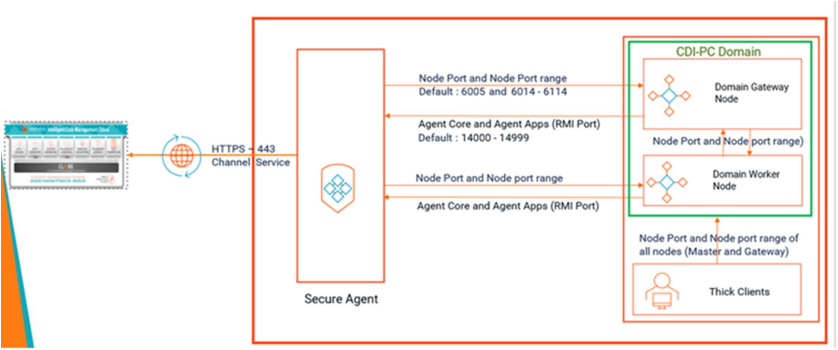
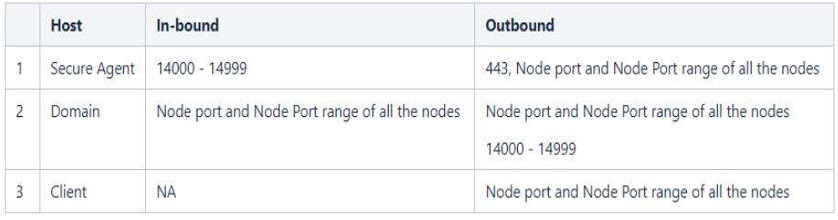
Prepare for migration by completing prerequisite tasks based on your chosen migration method—lifting and shifting, phased migration, or hybrid. These steps may include environment assessments, data backup, compatibility checks, stakeholder communication, and configuration adjustments to ensure a smooth transition.

- Configure keystore and truststore files.
- Validate the certificates using the TLS utility.
- Enable secure communication.
- Update the environment variables on the PowerCenter server and client.
- Configure TLS for the secure agent.
Completing these steps will help establish a robust and secure data integration setup.






Clear accumulated workflow and session logs in PowerCenter to optimize system performance. Follow this by running update statistics on database tables to refresh metadata, ensuring efficient query execution.

Regularly back up PowerCenter Domain files along with metadata and configuration files to safeguard your environment and support recovery if needed.

Explore interactive demos on PowerCenter Modernization available now in the Experience Lounge