CDI-PC Assessment & Conversion
How to Create Knowledge Articles from the Authoring Home Page of SFDC Knowledge?
Informatica Search Experience
IICS Cloud Assurance Package - Feature Impact & Upgrade Readiness
Preview: Informatica Community
Informatica Success Portal Overview
Informatica Cloud Data Marketplace Demo - Part 2
Cloud Data Governance and Catalog Overview - Part 1
Feature Impact
How to Moderate Flagged Content on Informatica Community?
Content Governance Series 2 - Content Standards Checklist
How to Create an Event from the Community Operations App?
How to Create a Blog in the Informatica Community Portal
Informatica Intelligent Data Enterprise Data Governance and Privacy Perspective
Business Process Decomposition Strategy
Ask Diana - Intelligent Virtual Assistant for Cloud Data Integration
How to Moderate Ideas on Informatica Community
How to Add Content in the Highlights Widget of a Product Community
Cloud Data Marketplace Overview - Part 1
BCSP Program
Deployment
CDGC Governance Thinking & Best Practices
Informatica CICD and DevOps
Informatica Knowledge Base Search Demo
Informatica Cloud Data Quality Demo - Part 2
Informatica Meet the Experts – Migrating OEM MFT Endpoints to Informatica MFT 20180613 1505 1
How to Use the OnDemand Labs from Informatica University
Metadata Command Center (MCC)
How to update a case on eSupport
How to Create a Case with Informatica eSupport
Data Governance Overview
Cloud Data Governance and Catalog Demo - Part 2
Enterprise Data Catalog Advanced Scanners - Part 1
How to download HotFix installers on Informatica Network
Learn how to lower cost and speed up data processing with Advanced Pushdown Optimization (APDO)
How to add a Support Account contact on eSupport
Article Feedback in SFDC Knowledge
How to search and download cases on eSupport
Informatica University OnDemand Training: How to Use the Labs
No-Code Data Integration Community Member Spotlight: An Interview with Timo Sun [Part-2]
No-Code Data Integration Community Member Spotlight: An Interview with Timo Sun [Part-1]
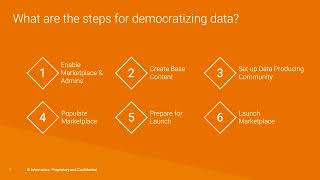
Assign Owners and Launch Marketplace
Cloud Data Market Place Learning Path: Step 5 - Curate and Refine
CDI-PC Domain Migration Demo on Windows OS
Cloud Data Marketplace (CDMP) Quick Start Guide: Content Creation (Bulk Upload)
How to Register Informatica IDMC with Snowflake using Free Trials | Step-by-Step Guide
Customize If Required
How to search for Product Documents and H2Ls in the Informatica Knowledge Base
Cloud Data Validation (CDV)
Introduction to Business 360 Accelerators
Enterprise Data Catalog Advanced Scanners - Part 2
Measure Business Impact
BCSP
Learn, Explore, and Share: 5 Fresh Experience Lounge Features to Bring Your Data & AI to Life
Upgrade Analysis
How to track Change Request on Informatica Network
CDI-PC Assessment & Conversion
No-Code Data Integration Community Member Spotlight: An Interview with Nico Heinze (Part-2)
How to Request a Success Accelerator Engagement
Meta Insights Activity Tracker
Cloud Data Validation
Getting Started with Cloud Marketplace
CDIPC - Domain Migration Demo
Cloud Data Market Place Learning Path Overview
Cloud Data Market Place Learning Path: Step 6 - Automate
Collaborate and Listen
Monitor Usage
Roles: Data Market Place Personas
Cloud Data Market Place Learning Path: Step 1 - Plan
Introducing Usage Types
Cloud Data Market Place Learning Path: Step 3 - Create Content
Cloud Data Market Place Learning Path: Step 4 - Rollout
Cloud Data Market Place Learning Path: Step 2 - Prepare
How to Submit a Case in the FedRAMP Customer Support Portal
No-Code Data Integration Community Member Spotlight: An Interview with Nico Heinze (Part-1)
Introducing Delivery
How to Schedule a Digital Ask an Expert session
Customer Success Accelerators
Introducing Categories and Content
Introducing Terms of Use
CDI-PC Domain Migration Demo
How to Reset User's Password (as the Primary Account) in FedRAMP Support Portal
CDGC Scanner Configuration: IDERA ER/Studio Data Architect
SumItUp with Sumeet: Informatica iPaaS Innovation Update, Q3 2024
Iterate
Initial Response Quick Recommendations Feature
Success
Link Copied to Clipboard